When building modern mobile applications, third-party integrations, or decoupled frontends (Vue, React, Next.js), your backend API is the engine of your entire digital product. If an API request takes 800ms, the user interface feels sluggish, batteries drain faster on mobile devices, and high-frequency webhook consumers begin to time out.
A production-grade REST API should reliably respond in under 100 milliseconds under concurrent load.
Laravel is often incorrectly labeled "too slow" for high-scale APIs by developers who misunderstand how to configure it. When architected properly, Laravel can comfortably process tens of millions of API requests daily.
If you are building an API-driven product or seeking expert custom software and API engineering services, here is the comprehensive architectural blueprint for building high-performance REST APIs in Laravel.
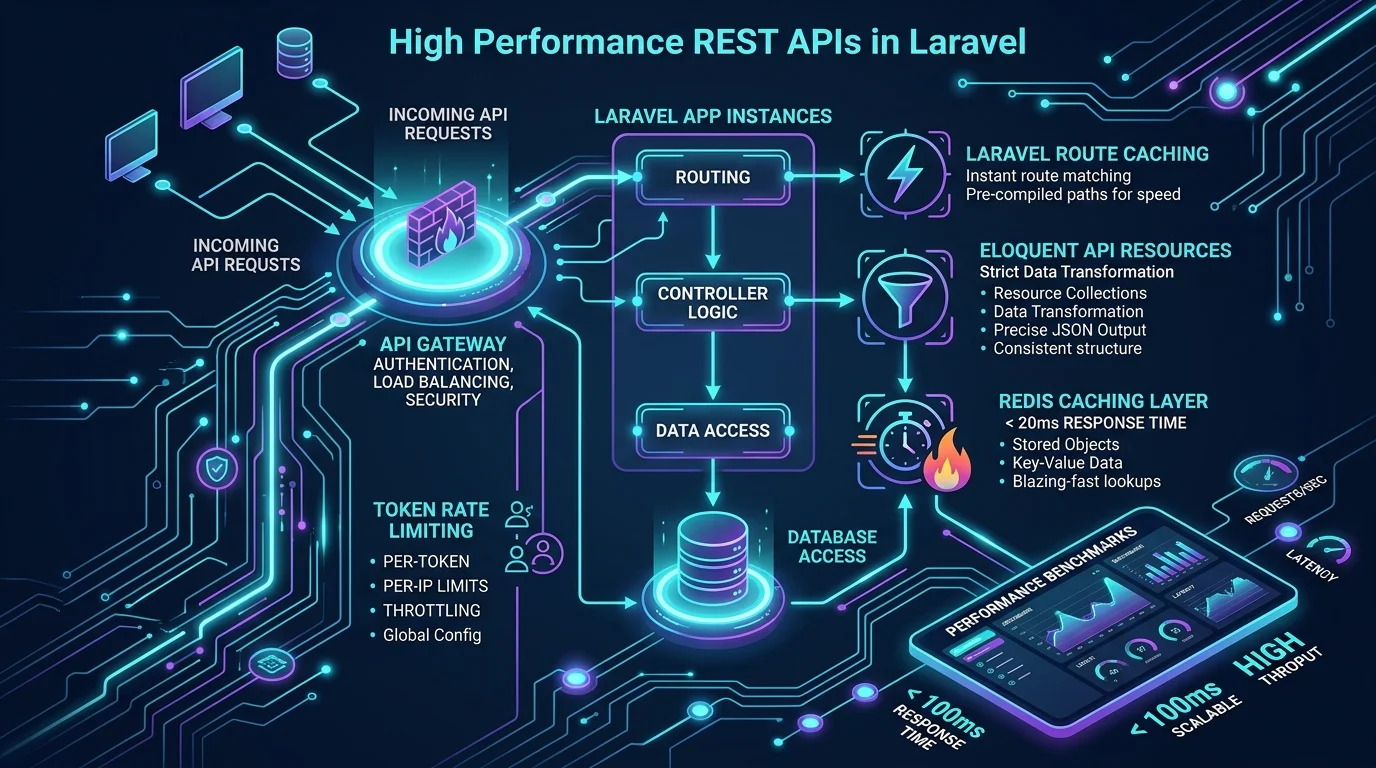
1. Establishing the Contract: Eloquent API Resources
Never return raw Eloquent models directly from your controller methods:
// BAD: Returns all internal table columns, vulnerable to data leaks
public function show(User $user)
{
    return response()->json($user);
}
Always transform your responses using Eloquent API Resources. Resources provide a strict data contract, protect private database columns, format timestamps consistently (ISO 8601), and handle conditional relationship loading cleanly:
namespace App\Http\Resources\Api\V1;

use Illuminate\Http\Request;
use Illuminate\Http\Resources\Json\JsonResource;

class OrderResource extends JsonResource
{
    public function toArray(Request $request): array
    {
        return [
            'id' => $this->id,
            'reference_number' => $this->reference_number,
            'status' => $this->status,
            'total_amount' => (float) $this->total_amount,
            'currency' => $this->currency,

            // Conditional relationship inclusion prevents N+1 queries
            'items' => OrderItemResource::collection($this->whenLoaded('items')),
            'customer' => new CustomerResource($this->whenLoaded('customer')),

            'created_at' => $this->created_at->toIso8601String(),
        ];
    }
}
2. Fast Route Resolution & Configuration Caching
In production, Laravel shouldn't parse PHP route files on every request. Always enable production compilation:
# Compile all routes into a fast lookup table
php artisan route:cache

# Compile all configuration files into a single array
php artisan config:cache

# Pre-compile Blade templates and events
php artisan event:cache
These three commands alone frequently reduce base request bootstrap latency by 40% to 60%.
3. High-Speed Response Caching with Redis
If an API endpoint serves data that changes infrequently (such as product catalogs, pricing tiers, or user permissions), caching the formatted JSON directly in Redis delivers response times of 10ms to 20ms:
namespace App\Http\Controllers\Api\V1;

use App\Models\Product;
use App\Http\Resources\Api\V1\ProductResource;
use Illuminate\Support\Facades\Cache;

class ProductController extends Controller
{
    public function index()
    {
        $cacheKey = 'api:v1:products:active';

        $products = Cache::remember($cacheKey, now()->addMinutes(30), function () {
            return Product::with('category:id,name')
                ->where('is_active', true)
                ->orderBy('sort_order')
                ->get();
        });

        return ProductResource::collection($products);
    }
}
When an administrator updates a product, an Eloquent Observer or Model Event purges api:v1:products:active, guaranteeing users always receive fresh data without manual cache clearing.
4. Intelligent Rate Limiting & DoS Defense
Unprotected APIs invite scraping, credential stuffing, and unintentional denial of service from poorly coded third-party integrations.
Configure multi-tiered rate limiting in bootstrap/app.php or AppServiceProvider:
use Illuminate\Cache\RateLimiting\Limit;
use Illuminate\Support\Facades\RateLimiter;
use Illuminate\Http\Request;

RateLimiter::for('api', function (Request $request) {
    // Authenticated users get higher throughput based on their tier
    if ($request->user()) {
        $rpm = $request->user()->is_premium ? 240 : 60;
        return Limit::perMinute($rpm)->by($request->user()->id);
    }

    // Anonymous guests are throttled strictly by IP address
    return Limit::perMinute(20)->by($request->ip());
});
Attach this named limiter to your API route groups:
Route::middleware(['throttle:api'])->prefix('v1')->group(function () {
    Route::apiResource('orders', OrderController::class);
});
5. Clean API Versioning
API versioning allows you to deploy breaking changes without breaking older versions of mobile apps currently live in the Apple App Store or Google Play Store:
routes/
├── api_v1.php  -> App\Http\Controllers\Api\V1\...
└── api_v2.php  -> App\Http\Controllers\Api\V2\...
In routes/api.php:
Route::prefix('v1')->group(base_path('routes/api_v1.php'));
Route::prefix('v2')->group(base_path('routes/api_v2.php'));
6. Asynchronous Offloading: Never Block the Response
Every millisecond counts. Operations that do not directly affect the response body should be pushed to background workers:
- Dispatching email or push notifications
- Generating PDF receipts
- Firing webhook notifications to external platforms
- Running heavy analytics or audit logging
// Instant response: The user gets HTTP 201 Created in 45ms
public function store(StoreOrderRequest $request)
{
    $order = Order::create($request->validated());

    // Dispatched to Redis background queue immediately
    dispatch(new ProcessOrderPaymentJob($order));
    dispatch(new SendOrderConfirmationEmailJob($order));

    return new OrderResource($order);
}
Build High-Scale APIs with Senior Architecture
Whether you are launching a greenfield SaaS product, architecting mobile backend infrastructure, or untangling a legacy API bottleneck, clean engineering makes all the difference.
Review our proven engineering track record in our Case Studies and Portfolio. Ready to build or optimize your backend API? Contact Smit Desai to discuss your technical architecture.