In modern web development, keeping the HTTP request-response cycle fast is non-negotiable. If a user clicks "Export CSV" or submits an order, their browser should receive a confirmation response within 100ms. Operations like sending transactional emails, syncing data with external CRMs, converting video files, or calculating quarterly reports must run asynchronously in the background.
Laravel’s built-in queue system is world-class, but as transaction volumes grow from hundreds of jobs to millions of jobs daily, default configurations will break:
- Workers get stuck and run out of memory.
- Low-priority jobs block high-priority transactional emails.
- Third-party APIs hit rate limits and fill failed job tables with thousands of errors.
If you are scaling a data-heavy application or need expert software engineering and architecture consulting, here is the production blueprint to scale Laravel queues using Redis and Laravel Horizon.
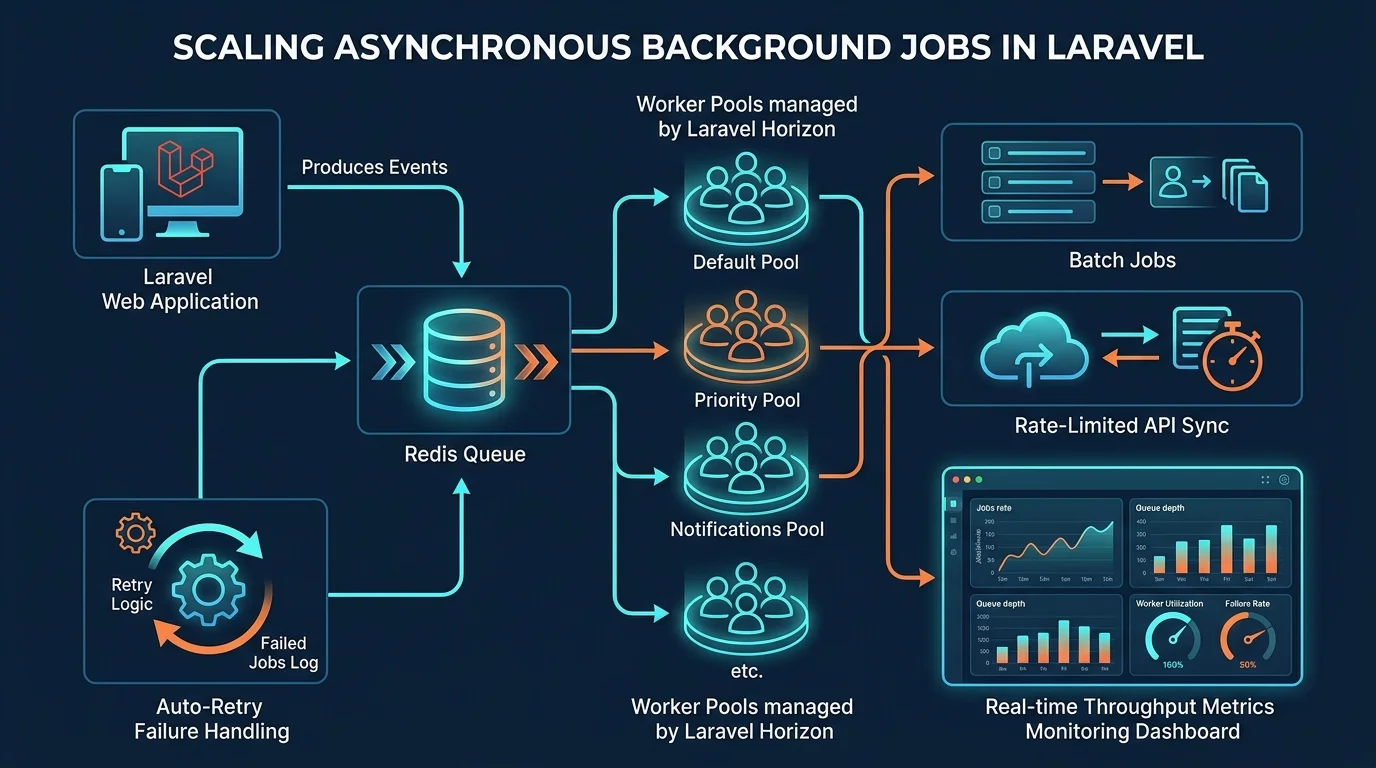
1. Ditch the Database Driver: Why Redis is Mandatory
The default database queue driver in Laravel is convenient for local development, but using it in production is a major anti-pattern:
- Every worker constantly polls your database:
SELECT * FROM jobs WHERE queue = ? FOR UPDATE. - At 20 active workers, this creates thousands of locking queries per minute on your primary MySQL instance, degrading performance for real web users.
Redis stores queues in-memory using atomic list and sorted-set operations (BLPOP, ZADD). It handles tens of thousands of pushes and pops per second with sub-millisecond latency and zero relational database locking overhead.
Configure your .env:
QUEUE_CONNECTION=redis
REDIS_CLIENT=phpredis
2. Segmenting Workloads into Dedicated Priority Pools
Never dump every background task into a single default queue. A customer who requests a bulk export of 50,000 invoices should never delay a password reset email for another user.
Define Named Queues:
high: Password resets, two-factor SMS codes, payment authorization webhooks.default: Standard order processing, push notifications.low: Nightly batch syncs, analytics events, search index regeneration.
In your Jobs, specify the queue destination explicitly:
namespace App\Jobs;

use Illuminate\Contracts\Queue\ShouldQueue;
use Illuminate\Foundation\Queue\Queueable;

class SendTwoFactorCodeJob implements ShouldQueue
{
    use Queueable;

    public function __construct(public User $user)
    {
        // Enforce high priority
        $this->onQueue('high');
    }

    public function handle(): void
    {
        // SMS transmission logic
    }
}
3. Configuring Laravel Horizon for Auto-Scaling
Laravel Horizon provides an enterprise dashboard and code-driven configuration for your Redis queues.
Instead of writing brittle shell scripts to manage Supervisor worker processes, define your complete worker pool architecture inside config/horizon.php:
'environments' => [
    'production' => [
        'supervisor-high' => [
            'connection' => 'redis',
            'queue' => ['high'],
            'balance' => 'simple',
            'processes' => 5, // Dedicated workers always ready for critical jobs
            'tries' => 3,
            'timeout' => 30,
        ],
        'supervisor-default' => [
            'connection' => 'redis',
            'queue' => ['default', 'low'],
            'balance' => 'auto', // Dynamically scales workers based on workload spikes
            'minProcesses' => 3,
            'maxProcesses' => 15,
            'balanceMaxShift' => 2,
            'balanceCooldown' => 3,
            'tries' => 3,
            'timeout' => 120,
        ],
    ],
],
With balance => 'auto', Horizon automatically shifts idle worker processes to queues experiencing traffic spikes, ensuring queues drain quickly during flash sales or traffic surges.
4. Handling Third-Party Rate Limits Without Job Failures
When background jobs interact with rate-limited APIs (like Stripe, HubSpot, or OpenAI), hitting a rate limit shouldn't mark the job as failed. Use Job Middleware with Redis Rate Limiting:
namespace App\Jobs\Middleware;

use Illuminate\Support\Facades\Redis;

class RateLimitedApiMiddleware
{
    public function handle(object $job, callable $next): void
    {
        Redis::throttle('external-api')
            ->block(0) // Don't block workers waiting
            ->allow(10) // Allow 10 requests
            ->every(60) // Per 60 seconds
            ->then(function () use ($job, $next) {
                $next($job);
            }, function () use ($job) {
                // If throttled, release back to queue with exponential delay
                $job->release(30);
            });
    }
}
Attach this middleware to your job:
public function middleware(): array
{
    return [new RateLimitedApiMiddleware];
}
5. Preventing PHP Memory Leaks in Long-Running Workers
Because queue workers run as persistent PHP daemon processes, any memory un-freed by circular references or static arrays accumulates over time until the worker is killed with an Allowed memory size exhausted fatal error.
Protect your servers by:
- Setting
--max-jobs=1000to instruct workers to restart cleanly after processing 1,000 jobs. - Disabling database query logging:
DB::disableQueryLog()inside worker boot processes so MySQL queries don't stay buffered in memory. - Calling
gc_collect_cycles()manually after processing large batches.
Build Resilient High-Throughput Systems
Asynchronous queues are the foundation of scalable modern web architectures. Building reliable queues that never drop orders or crash under load requires experience with distributed systems and caching layers.
Review our technical architecture work across real client projects in our Case Studies or learn how we help businesses through our Software Services. Ready to scale your application infrastructure? Schedule a consultation with Smit Desai to audit your system.