Security is never a feature you finish building—it is a continuous engineering discipline. While Laravel is arguably the most secure web framework in the PHP ecosystem, even seasoned developers inadvertently introduce vulnerabilities through unvalidated user inputs, overly permissive file uploads, or misconfigured server permissions.
A single data breach can destroy customer trust, trigger severe regulatory fines (GDPR, CCPA), and paralyze operations.
Whether you are preparing for an enterprise client security review or need an experienced engineer to audit and harden your software, here is the production-tested security audit checklist to ensure your Laravel application is bulletproof.
1. Authentication & Session Hardening
Your authentication layer is the front gate of your application.
- Enforce Strong Password Policies: Require at least 10 characters with mixed cases, numbers, and symbols using Laravel's native rules:
'password' => ['required', 'confirmed', Password::min(10)->mixedCase()->numbers()->symbols()->uncompromised()] - Enable Session Fixation Protection: Ensure
Session::regenerate()is called immediately upon successful user login. - Secure Cookie Flags: In
config/session.php, enforce secure, HTTP-only, and SameSite cookie policies:'secure' => env('SESSION_SECURE_COOKIE', true), 'http_only' => true, 'same_site' => 'lax', // or 'strict'
2. Preventing Mass Assignment Vulnerabilities
Mass assignment occurs when HTTP request payloads overwrite sensitive model attributes (like is_admin, role, or balance).
Dangerous Pattern:
// CRITICAL RISK: An attacker can pass {"is_admin": true} in the JSON body
User::create($request->all());
Secure Pattern:
Always validate your inputs with Form Requests, and only pass the validated data:
User::create($request->validated());
Additionally, in your Eloquent models, strictly enumerate fillable properties rather than relying on empty $guarded = []:
class User extends Authenticatable
{
    protected $fillable = [
        'name',
        'email',
        'password',
    ];
}
3. SQL Injection Defense & Safe Query Building
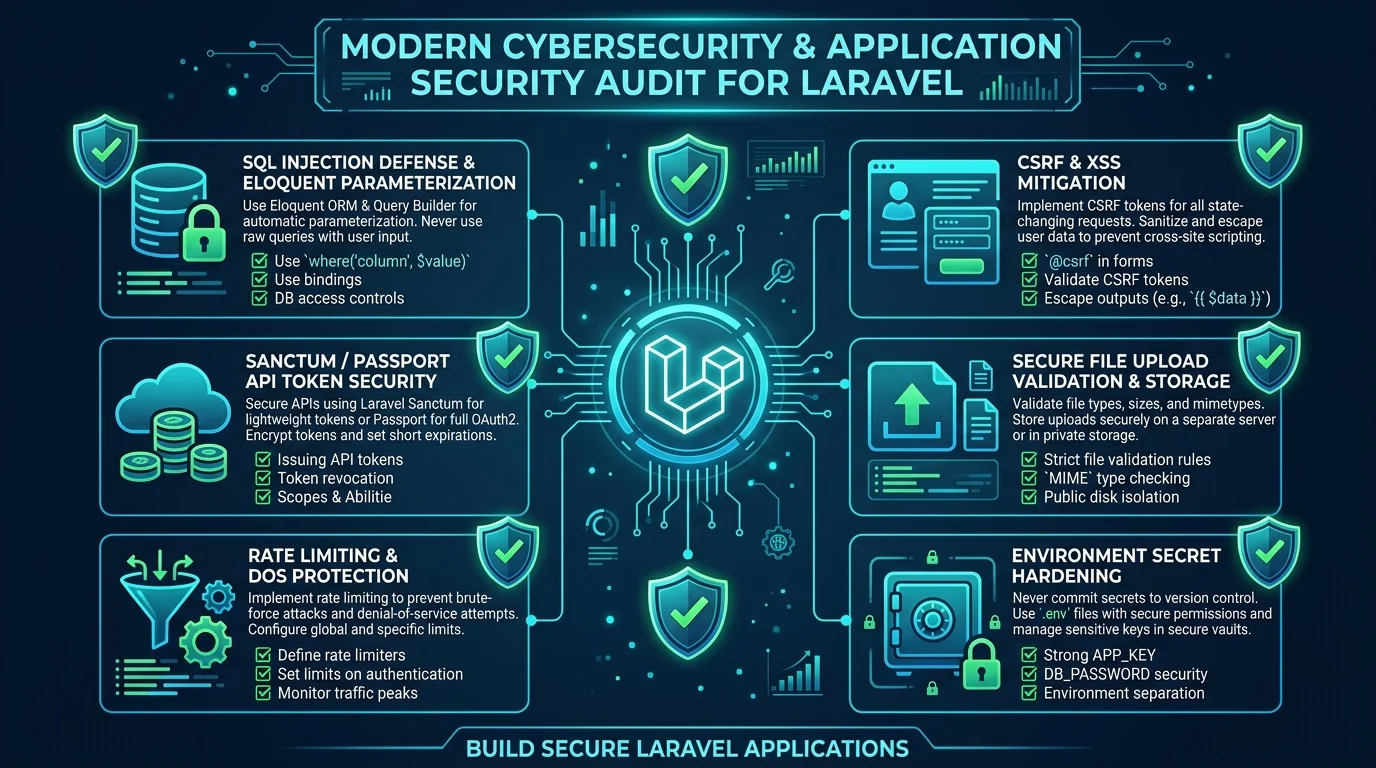
Laravel's Eloquent ORM and Query Builder use PDO parameter binding under the hood, making standard queries immune to SQL injection. Vulnerabilities arise when developers concatenate raw user input into whereRaw(), orderByRaw(), or selectRaw().
The Vulnerable Query:
// CRITICAL RISK: Unescaped string concatenation
$orders = Order::whereRaw("status = '" . $request->input('status') . "'")->get();
The Hardened Query:
Always use bindings to ensure PDO sanitizes the values:
$orders = Order::whereRaw("status = ?", [$request->input('status')])->get();
Never pass unsanitized query parameters directly into orderByRaw():
// Whitelist allowed sort columns
$allowedSorts = ['created_at', 'total', 'status'];
$sort = in_array($request->sort, $allowedSorts, true) ? $request->sort : 'created_at';

$orders = Order::orderBy($sort, 'desc')->get();
4. Cross-Site Scripting (XSS) & Content Security Policy (CSP)
Blade escapes output by default using {{ $variable }} (equivalent to htmlspecialchars). However:
- Never use unescaped Blade
{!! $untrustedInput !!}on user-generated content. - If rich-text HTML must be rendered (e.g., blog comments or forum posts), sanitize the markup server-side using a strict HTML Purifier before storing or rendering it.
- Implement Security Headers: Add strict headers in your global middleware:
$response->headers->set('X-Frame-Options', 'SAMEORIGIN');
$response->headers->set('X-Content-Type-Options', 'nosniff');
$response->headers->set('X-XSS-Protection', '1; mode=block');
$response->headers->set('Referrer-Policy', 'strict-origin-when-cross-origin');
$response->headers->set('Content-Security-Policy', "default-src 'self'; script-src 'self' 'unsafe-inline';");
5. File Upload Hardening
Malicious file uploads are one of the most devastating attack vectors, allowing remote code execution (RCE) if an attacker uploads a PHP script disguised as an image.
Always enforce:
- Validate MIME Types, not just extensions:
'avatar' => ['required', 'file', 'mimes:jpg,jpeg,png,webp', 'max:5120'] - Never store uploaded files in public web directories directly: Store files in private storage disks (e.g., S3 or
storage/app/private) and serve them via authorized stream controllers or signed temporary URLs. - Randomize file names: Never preserve the original uploaded filename (
$file->hashName()).
6. Server Infrastructure & Secret Management
- Document Root: Ensure Nginx or Apache points strictly to
/var/www/yourapp/public, never the root directory containing.envandcomposer.json. - Turn Off Debug Mode: Ensure
APP_DEBUG=falsein all non-local environments. LeavingAPP_DEBUG=truein production displays stack traces containing database passwords and secret API keys to anyone who triggers an error. - Automated Dependency Auditing: Run Composer security checks in your CI/CD pipeline:
composer audit
Schedule a Comprehensive Security Review
Even high-performing software teams can overlook security flaws when focused on shipping features under tight deadlines. A dedicated third-party code review provides fresh perspective and peace of mind.
Learn how we audit and secure enterprise web software through our Software Engineering Services and Legacy Modernization Programs. Contact Smit Desai to schedule a confidential security and architecture audit.