In the modern software landscape, virtually every SaaS and enterprise product is looking to integrate artificial intelligence: automated document analysis, smart customer support agents, generative draft creation, or conversational interfaces.
However, calling OpenAI, Anthropic, or open-source LLM APIs inside a standard web controller like a routine database query is a recipe for disaster. Model inference takes anywhere from 3 to 20 seconds. Calling an LLM synchronously freezes PHP-FPM worker threads, causes reverse proxy timeouts (HTTP 504), and ruins the user experience.
To integrate AI capabilities reliably into existing systems, you need a disciplined architecture: Server-Sent Events (SSE) for token streaming, asynchronous queues for heavy batch analysis, prompt caching in Redis, and Retrieval-Augmented Generation (RAG).
If your business is planning to add AI capabilities or needs a forward deployed engineer to integrate AI systems into live infrastructure, here is the production architecture blueprint for Laravel.
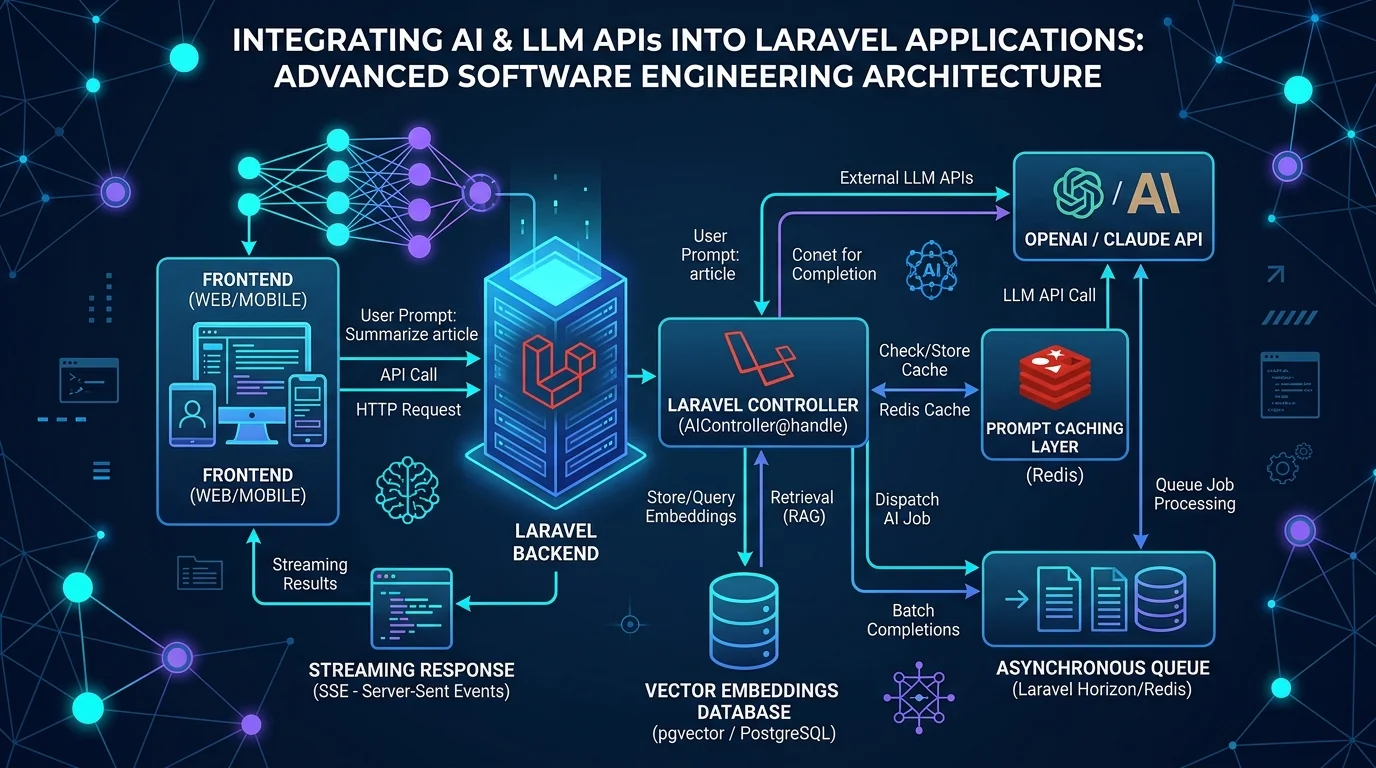
1. The High Latency Challenge: Synchronous vs. Streaming Architecture
When a user asks an AI assistant to analyze a 10-page document, waiting 12 seconds for a complete HTTP JSON response creates severe friction. Users often assume the app has crashed and refresh the page, triggering duplicate expensive API charges.
Instead, stream generated tokens to the browser in real time using Server-Sent Events (SSE):
namespace App\Http\Controllers\Api\V1;

use Illuminate\Http\Request;
use Symfony\Component\HttpFoundation\StreamedResponse;
use OpenAI\Laravel\Facades\OpenAI;

class AiAssistantController extends Controller
{
    public function streamChat(Request $request): StreamedResponse
    {
        $prompt = $request->validate(['message' => 'required|string|max:1000'])['message'];

        return response()->stream(function () use ($prompt) {
            $stream = OpenAI::chat()->createStreamed([
                'model' => 'gpt-4o-mini',
                'messages' => [
                    ['role' => 'system', 'content' => 'You are an expert technical assistant.'],
                    ['role' => 'user', 'content' => $prompt],
                ],
            ]);

            foreach ($stream as $response) {
                $text = $response->choices[0]->delta->content;
                if (! empty($text)) {
                    echo "data: " . json_encode(['token' => $text]) . "\n\n";
                    if (ob_get_level() > 0) {
                        ob_flush();
                    }
                    flush();
                }
            }

            echo "data: [DONE]\n\n";
            if (ob_get_level() > 0) {
                ob_flush();
            }
            flush();
        }, 200, [
            'Content-Type' => 'text/event-stream',
            'Cache-Control' => 'no-cache',
            'Connection' => 'keep-alive',
            'X-Accel-Buffering' => 'no', // Disables Nginx buffering for instant token delivery
        ]);
    }
}
The frontend establishes an EventSource connection, displaying the first words within 250ms of user submission.
2. Slashing API Bills with Redis Prompt Caching
Many enterprise AI workloads involve repetitive questions: summarizing the same contract multiple times, or checking status reports.
Before firing an expensive external API request, calculate a SHA-256 hash of the normalized prompt and check Redis:
namespace App\Domain\Ai\Services;

use Illuminate\Support\Facades\Cache;
use OpenAI\Laravel\Facades\OpenAI;

class SmartAiService
{
    public function ask(string $systemPrompt, string $userInput): string
    {
        $cacheKey = 'ai:cache:' . hash('sha256', $systemPrompt . '||' . trim($userInput));

        return Cache::remember($cacheKey, now()->addDays(7), function () use ($systemPrompt, $userInput) {
            $response = OpenAI::chat()->create([
                'model' => 'gpt-4o-mini',
                'messages' => [
                    ['role' => 'system', 'content' => $systemPrompt],
                    ['role' => 'user', 'content' => $userInput],
                ],
            ]);

            return $response->choices[0]->message->content;
        });
    }
}
This single optimization often cuts third-party API costs by 30% to 50% while serving frequent queries in under 5ms.
3. Asynchronous Batch Processing with Laravel Queues
For batch workloads—such as extracting metadata from 5,000 uploaded customer PDFs, transcribing audio recordings, or recalculating product descriptions—never execute inside the web worker.
Push the workload to a dedicated Redis queue:
namespace App\Jobs;

use App\Models\Document;
use Illuminate\Contracts\Queue\ShouldQueue;
use Illuminate\Foundation\Queue\Queueable;
use Illuminate\Queue\InteractsWithQueue;

class AnalyzeDocumentWithAiJob implements ShouldQueue
{
    use Queueable, InteractsWithQueue;

    public int $timeout = 300; // Allow sufficient time for large models
    public int $tries = 3;

    public function __construct(public Document $document)
    {
        $this->onQueue('ai-processing');
    }

    public function handle(SmartAiService $aiService): void
    {
        $summary = $aiService->summarize($this->document->raw_text);

        $this->document->update([
            'ai_summary' => $summary,
            'status' => 'processed',
        ]);

        // Notify the user via WebSockets or email
        $this->document->user->notify(new DocumentAnalysisCompleted($this->document));
    }
}
4. Retrieval-Augmented Generation (RAG) with PostgreSQL pgvector
Public LLMs don't know your company's private operational data or proprietary business rules. Instead of training custom models (which is expensive and brittle), use RAG:
- Chunk and Embed: When internal documentation or policies are updated, split them into text chunks and generate vector embeddings (1536-dimension arrays).
- Store Vectors: Store embeddings in PostgreSQL using the
pgvectorextension:CREATE TABLE document_embeddings ( id BIGSERIAL PRIMARY KEY, document_id BIGINT REFERENCES documents(id), content TEXT NOT NULL, embedding vector(1536) ); - Similarity Search: When a user asks a question, embed their query and query PostgreSQL for the closest cosine distance matches:
SELECT content FROM document_embeddings ORDER BY embedding <=> '[user_query_vector]' LIMIT 5; - Augment the Prompt: Inject the top 5 matching text excerpts directly into the LLM prompt as trusted reference material.
Deploy Enterprise AI Capabilities with Senior Engineering
Integrating artificial intelligence into existing enterprise codebases requires high-level full-stack engineering: balancing database performance, queue management, streaming protocols, and API cost controls.
Explore our Full Stack Development Services and discover how a Forward Deployed Software Engineer can embed directly into your infrastructure to deploy working AI systems. Contact Smit Desai to map out your AI integration roadmap.