Performance problems in web applications rarely originate in the PHP runtime. PHP 8 executes bytecode at near-native speeds. In 90% of slow Laravel applications, the true bottleneck is inefficient database communication: runaway query volume, unindexed table scans, and bloated object hydration.
On one legacy enterprise engagement I took on, the core dashboard page fired 3,982 individual database queries on every page load. The server took over 4.5 seconds to respond, driving CPU utilization to 98% under minimal concurrent traffic. By methodically diagnosing the bottlenecks, refactoring the Eloquent relationships, and adding precise MySQL composite indexes, we reduced the query count down to 52 queries running in under 30 milliseconds.
Whether you are scaling an existing SaaS platform or need to audit and optimize software performance, here is the step-by-step engineering methodology to eliminate database lag in Laravel.
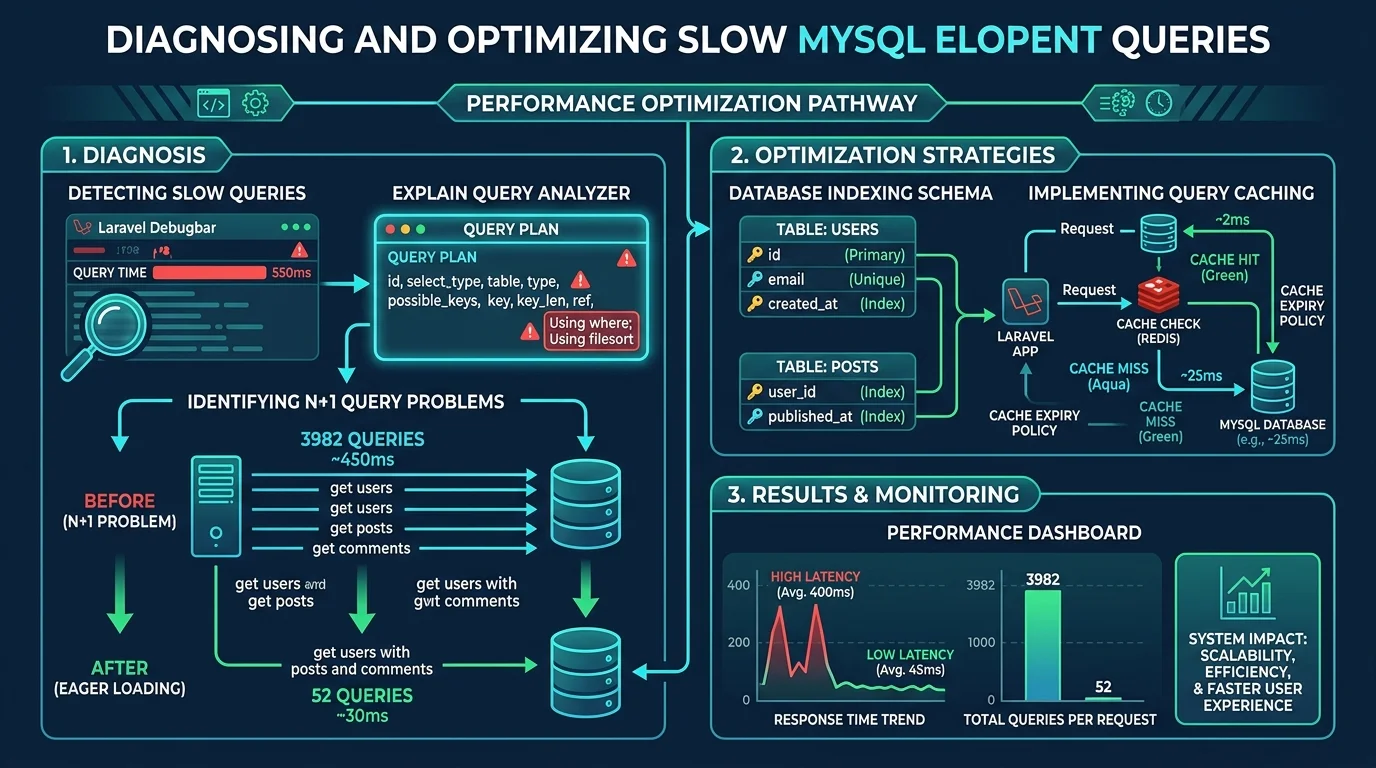
1. Finding the Culprits: Detection and Telemetry
You cannot fix what you cannot measure. Begin by capturing precise query telemetry.
In Local Development: Enforce Strict Model Handling
Add strict Eloquent violation prevention inside your AppServiceProvider:
namespace App\Providers;

use Illuminate\Database\Eloquent\Model;
use Illuminate\Support\ServiceProvider;

class AppServiceProvider extends ServiceProvider
{
    public function boot(): void
    {
        // Throws an exception in local development when lazy loading is detected
        Model::preventLazyLoading(! $this->app->isProduction());

        // Prevents silent discarding of un-fillable attributes
        Model::preventSilentlyDiscardingAttributes(! $this->app->isProduction());
    }
}
With preventLazyLoading active, any accidental lazy-load triggers an immediate LazyLoadingViolationException with the exact line of Blade or Controller code responsible.
In Production: Enable the MySQL Slow Query Log
Configure MySQL to log any query taking longer than 1 second:
# /etc/mysql/my.cnf
slow_query_log = 1
slow_query_log_file = /var/log/mysql/slow.log
long_query_time = 1
log_queries_not_using_indexes = 1
2. Eliminating the N+1 Query Problem
The N+1 query pattern occurs when your code iterates over a parent collection and accesses a relationship on each loop iteration without pre-loading it.
The Bad Pattern (3,982 Queries):
// 1 query to get 500 invoices
$invoices = Invoice::where('status', 'unpaid')->get();

foreach ($invoices as $invoice) {
    // 1 query per invoice to get customer (500 queries)
    // 1 query per invoice to get line items (500 queries)
    // 1 query per line item to get product taxes (2,982 queries!)
    echo $invoice->customer->name;
    foreach ($invoice->items as $item) {
        echo $item->taxRate->percentage;
    }
}
The Optimized Pattern (3 Queries):
Use Eloquent's with() method to eager-load nested relationships in batch operations:
$invoices = Invoice::with([
    'customer:id,name,email',
    'items.taxRate:id,percentage',
])->where('status', 'unpaid')->get();
Eloquent transforms thousands of round-trips into just 3 lightning-fast indexed queries:
SELECT * FROM invoices WHERE status = 'unpaid'SELECT id, name, email FROM customers WHERE id IN (...)SELECT * FROM invoice_items WHERE invoice_id IN (...)
3. Database Indexing: Turning Table Scans into B-Tree Lookups
Even with eager loading, queries will choke if MySQL is forced to scan millions of rows from disk rather than traversing indexed memory trees.
Reading MySQL EXPLAIN Plans
Always run EXPLAIN before and after adding indexes:
EXPLAIN SELECT id, total, created_at
FROM orders
WHERE store_id = 42 AND status = 'completed'
ORDER BY created_at DESC
LIMIT 20;
Look at the type and rows columns:
ALL: Full table scan. MySQL checks every single row in the table. Extremely dangerous at scale.ref/range: Indexed lookup. Fast.const: Direct primary key lookup. Instantaneous.Using filesort: MySQL had to sort rows in temporary memory because indexes didn't cover the sort direction.
Creating High-Impact Composite Indexes
Indexes must follow the Equality, Sort, Range (ESR) rule:
// In a Laravel database migration
Schema::table('orders', function (Blueprint $table) {
    // Composite index covering exact matches first, then ordering
    $table->index(['store_id', 'status', 'created_at'], 'orders_store_status_created_idx');
});
With this composite index in place, MySQL satisfies both the WHERE filters and the ORDER BY clause directly from the index tree without touching table rows or performing memory sorting.
4. Selecting Only What You Need (select() and chunk())
By default, Model::all() executes SELECT *. When your tables contain large text, json, or audit logs, Eloquent must allocate huge amounts of PHP memory to hydrate hundreds of heavy model instances.
// Bad: Loads 50 columns including text blobs into memory
$users = User::all();

// Good: Only hydrates the exact fields required
$users = User::select(['id', 'name', 'email'])->where('is_active', true)->get();
For large data exports or batch operations involving tens of thousands of records, never use get(). Use chunking or lazy collections to keep PHP memory flat:
// Processes 50,000 records using less than 15MB of RAM
Invoice::where('paid', false)->lazy()->each(function (Invoice $invoice) {
    $invoice->sendReminder();
});
5. Caching Strategically with Redis
Once queries are indexed and eager-loaded, add an in-memory caching layer with Redis for data that changes infrequently:
use Illuminate\Support\Facades\Cache;

public function getMonthlyRevenueSummary(int $storeId): array
{
    return Cache::remember("revenue_summary_{$storeId}", now()->addHours(6), function () use ($storeId) {
        return Order::where('store_id', $storeId)
            ->where('created_at', '>=', now()->startOfMonth())
            ->selectRaw('SUM(total) as revenue, COUNT(*) as orders_count')
            ->first()
            ->toArray();
    });
}
Invalidate cache tags automatically when model events fire using Eloquent Observers, ensuring users never see stale data.
6. Real-World Results
Applying this structured optimization workflow yields dramatic business improvements:
- Query Count: 3,982 queries reduced to 52 queries
- Server Latency: 4,500ms down to 28ms
- Database CPU Load: Dropped from 98% to under 6%
- Infrastructure Savings: Avoided a $400/month RDS database instance upgrade.
If your application suffers from slow queries, high latency, or memory crashes, read about our engineering services or contact us directly to book a database performance review.