HomePortfolioBolt House

Project · Rajkot, Gujarat, India

Bolt House — bolt stock in your pocket.

Mobile app for Android and iOS · Nut and bolt manufacturing

Bolt House makes MS nuts and bolts, and every product comes in a range of diameters and lengths, each with its own stock count. Its mobile app, built in React Native for Android and iOS, lets the team record stock in and out for any size from the phone, see a stock matrix for every product, follow the full history of movements and get a push notification when stock changes. Admins can also build customer estimates with matrix prices, discounts and tax, and save them as a PDF.

Client
Bolt House, Rajkot, Gujarat, India
Industry
Nut and bolt manufacturing
Built
Mobile app for Android and iOS
Serves
The owner, office staff and shop-floor team of a nut and bolt manufacturer
Stack
React Native · Android · iOS · React Native WebView
Live at
Used in-house by the Bolt House team; not public
Bolt House — Dashboard
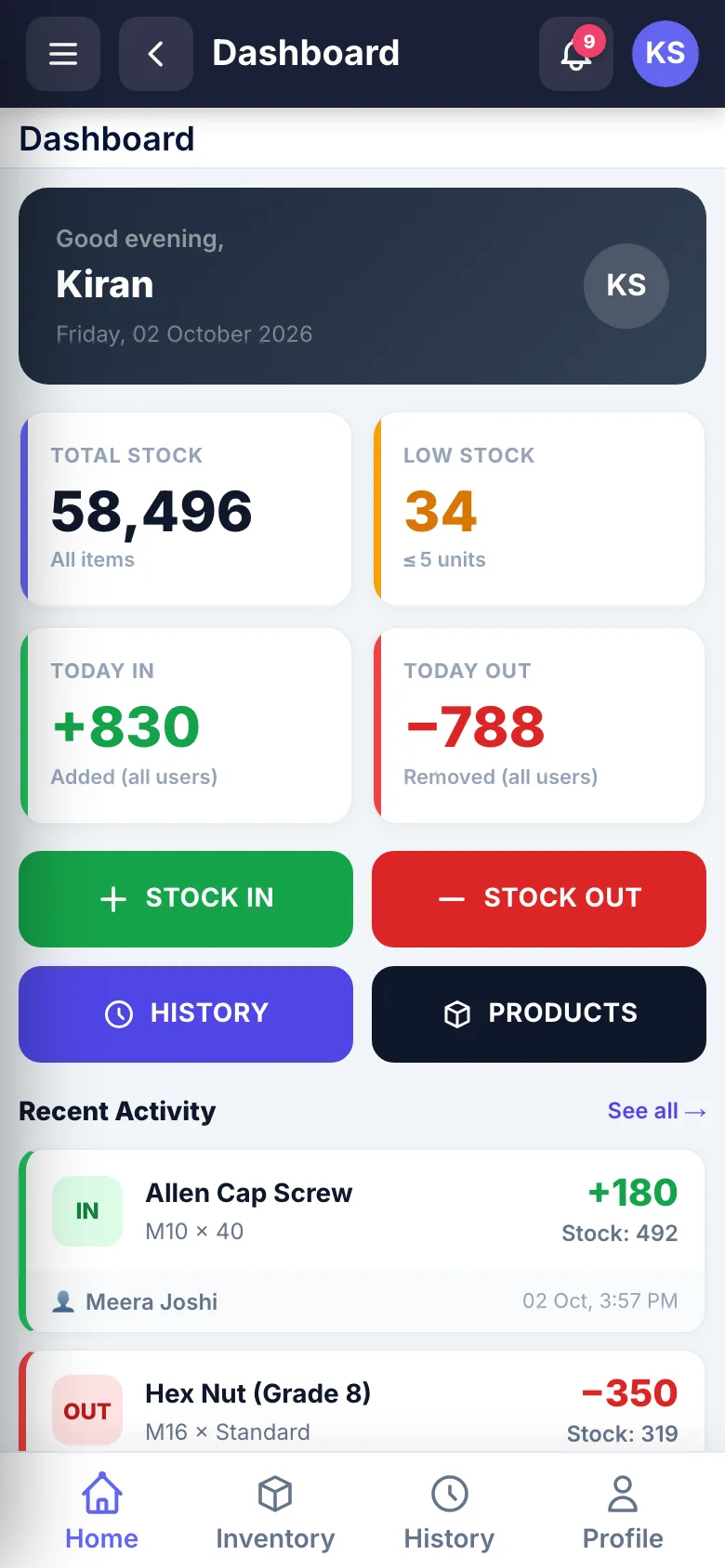
DashboardTotal stock, sizes running low and today's stock in and out, with Stock in, Stock out, History and Products one tap away.
Bolt House — Stock in and out
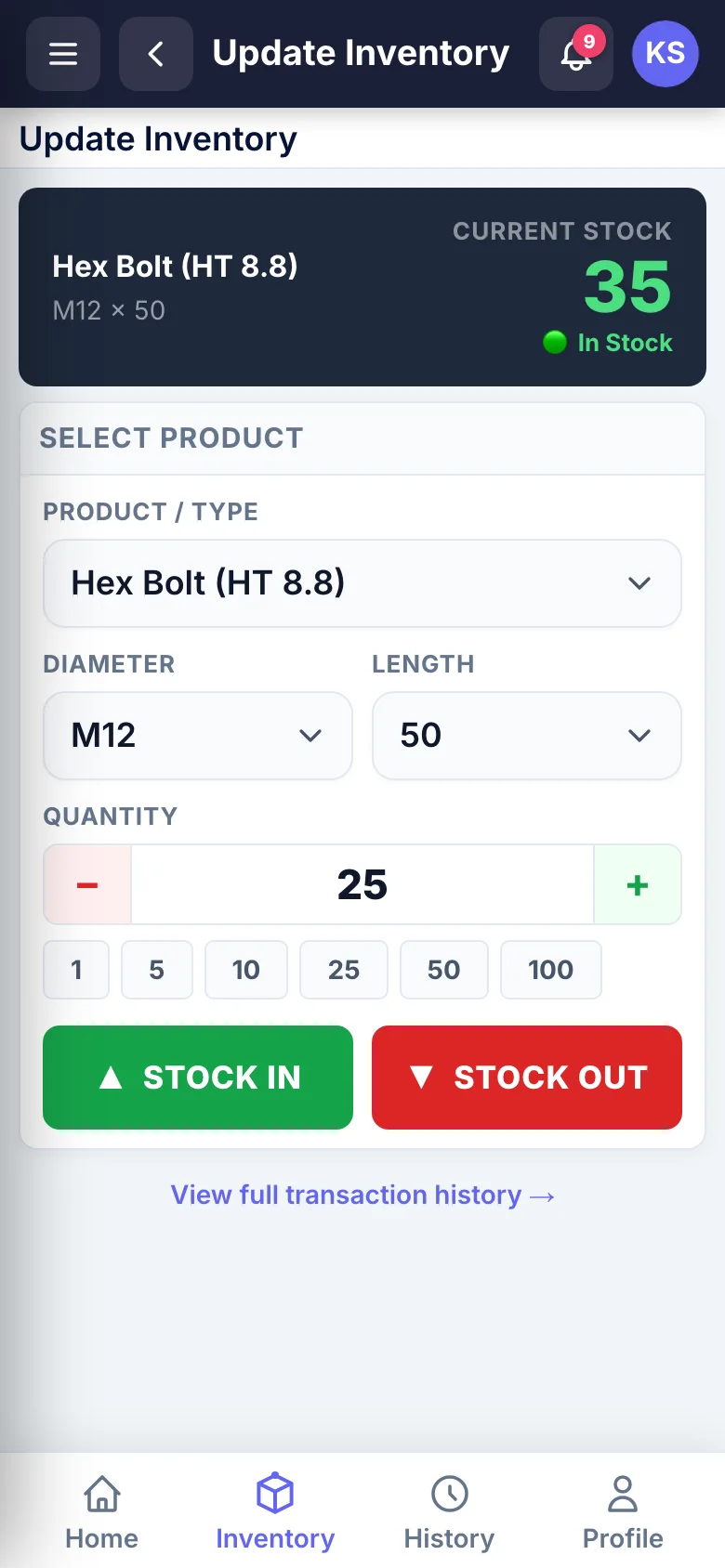
Stock in and outPick the product, diameter and length, see the current stock for that size, then add or remove a quantity.
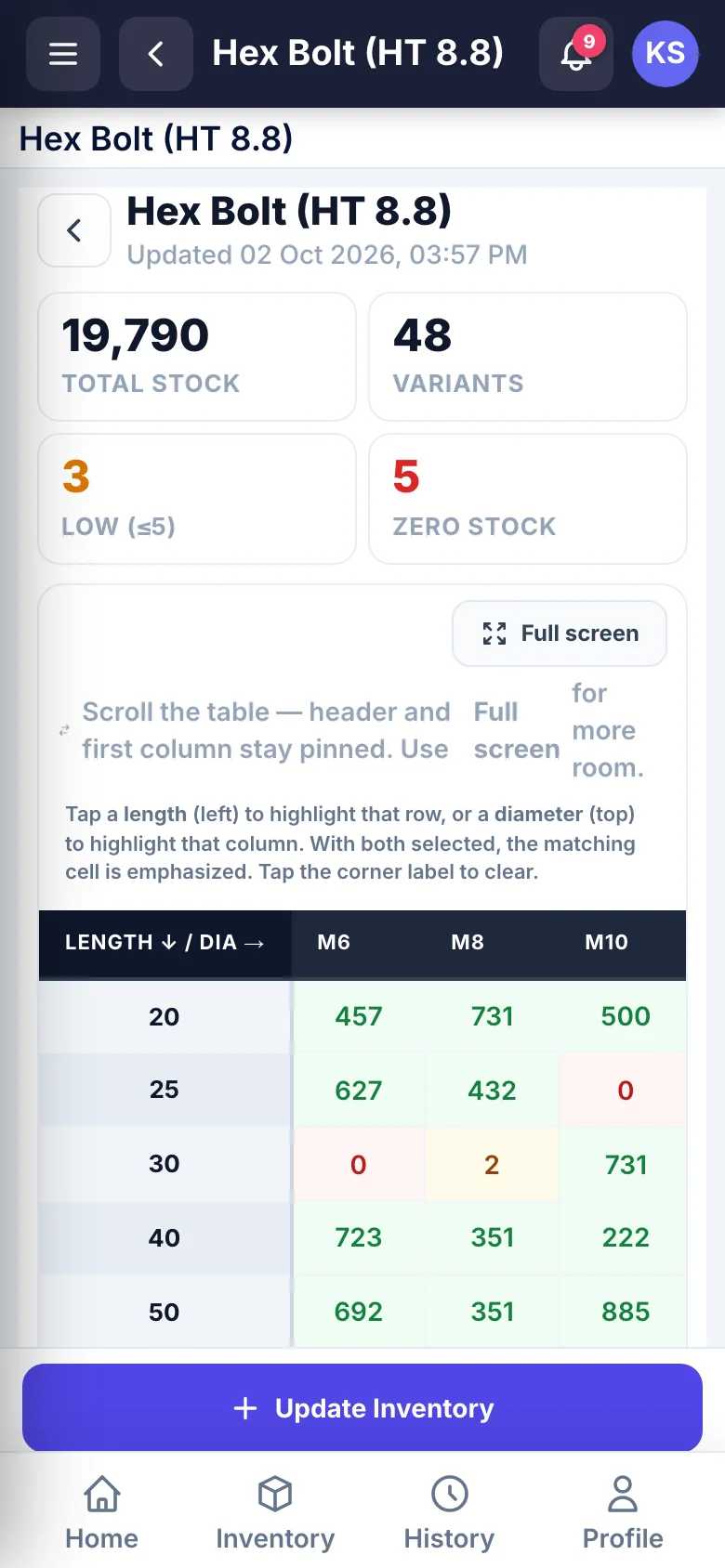
Bolt House — Stock matrix
Stock matrixEvery length and diameter of one product in a single grid, with empty and low sizes marked and totals above.

18

API endpoints behind the app

7

screens in the side menu

4

tabs in the bottom bar

6

one-tap quantity buttons

Counted from the Bolt House repository (API routes and mobile screens), 3 October 2026.

Every bolt we make comes in many diameters and lengths, and each one has its own stock. Now anyone on the team records stock in or out from their phone in a few taps, the matrix shows every size at once, and I get a notification the moment stock changes. Customer estimates come out as a PDF from the same app. Smit built it around the way our factory actually works.

Ravi Kansagra Owner, Bolt House, Rajkot, Gujarat, India

01 — The build

what the business needed, and what was made

The business

Bolt House manufactures MS nuts and bolts. Every product comes in a range of diameters and lengths, and each combination is a separate line of stock: a bolt in M12 × 50 is not the same item as M12 × 60, and the team needs to know how many of each are on the shelf.

Stock comes in and goes out through the day, and the app lets the person moving it update the count from their phone at that moment.

What the app had to do

  • Record stock in and stock out for any product and size in a few taps, on the phone people already carry.
  • Run on Android and iPhone from one codebase.
  • Show the stock for every size of a product at a glance, with the sizes running low easy to spot.
  • Tell the team when stock changes, without anyone having to check.
  • Keep a history of every movement, with who made it, and let mistakes be corrected.
  • Let the office prepare price estimates for customers from the same data.

What was built

Stock in and out by size

The Inventory tab asks for three things: the product, the diameter and the length. As soon as a size is chosen, the screen shows how many are in stock. A quantity can be typed or picked from preset buttons (1, 5, 10, 25, 50 and 100), and one tap on Stock in or Stock out saves it. The dashboard's Stock in and Stock out buttons open the same screen with the right action ready.

A matrix for every product

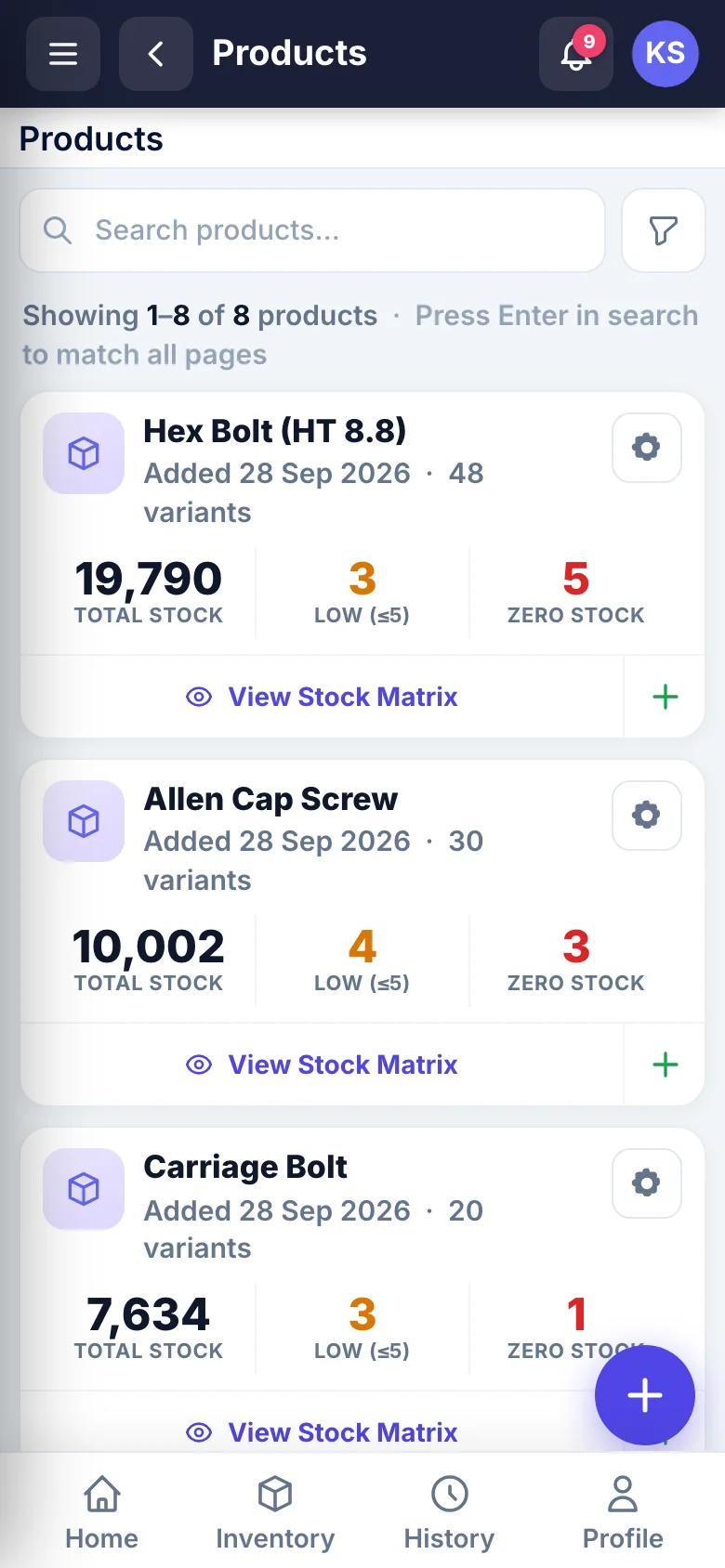
Each product has a stock matrix: lengths down the side, diameters across the top, one cell per size. Empty sizes and sizes with five or fewer pieces are marked, and the totals sit above the grid: total stock, number of sizes, low and zero. The product list repeats those counts for every product, so the gaps show up before anyone opens a matrix. Admins also keep a price matrix per product in the same shape.

History and corrections

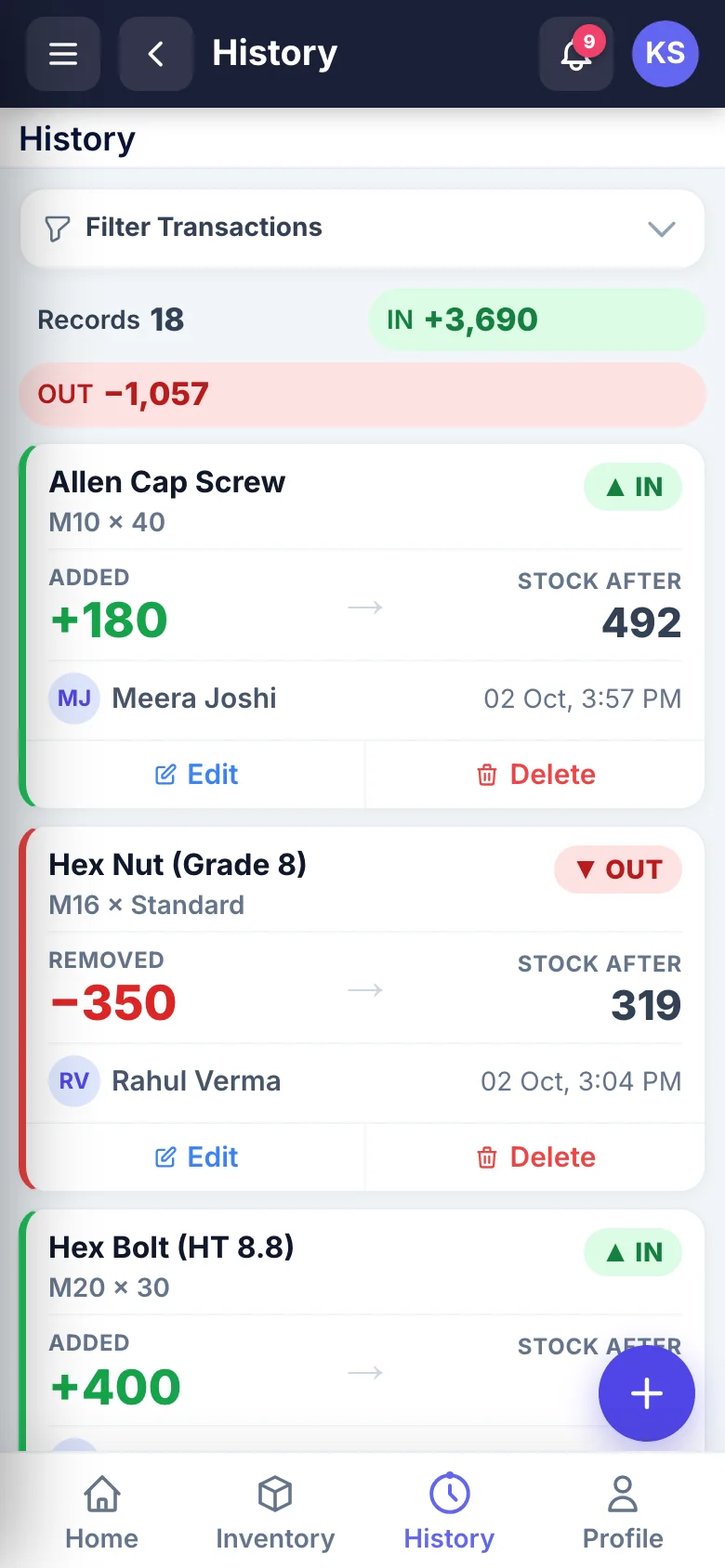
Every movement is kept: the product and size, in or out, the quantity, the stock left after it, who made it and when. The history can be filtered by product, size, direction and date, and shows the total in and out for the entries listed. When an entry was wrong it can be edited or deleted, and the stock count is adjusted to match.

Notifications

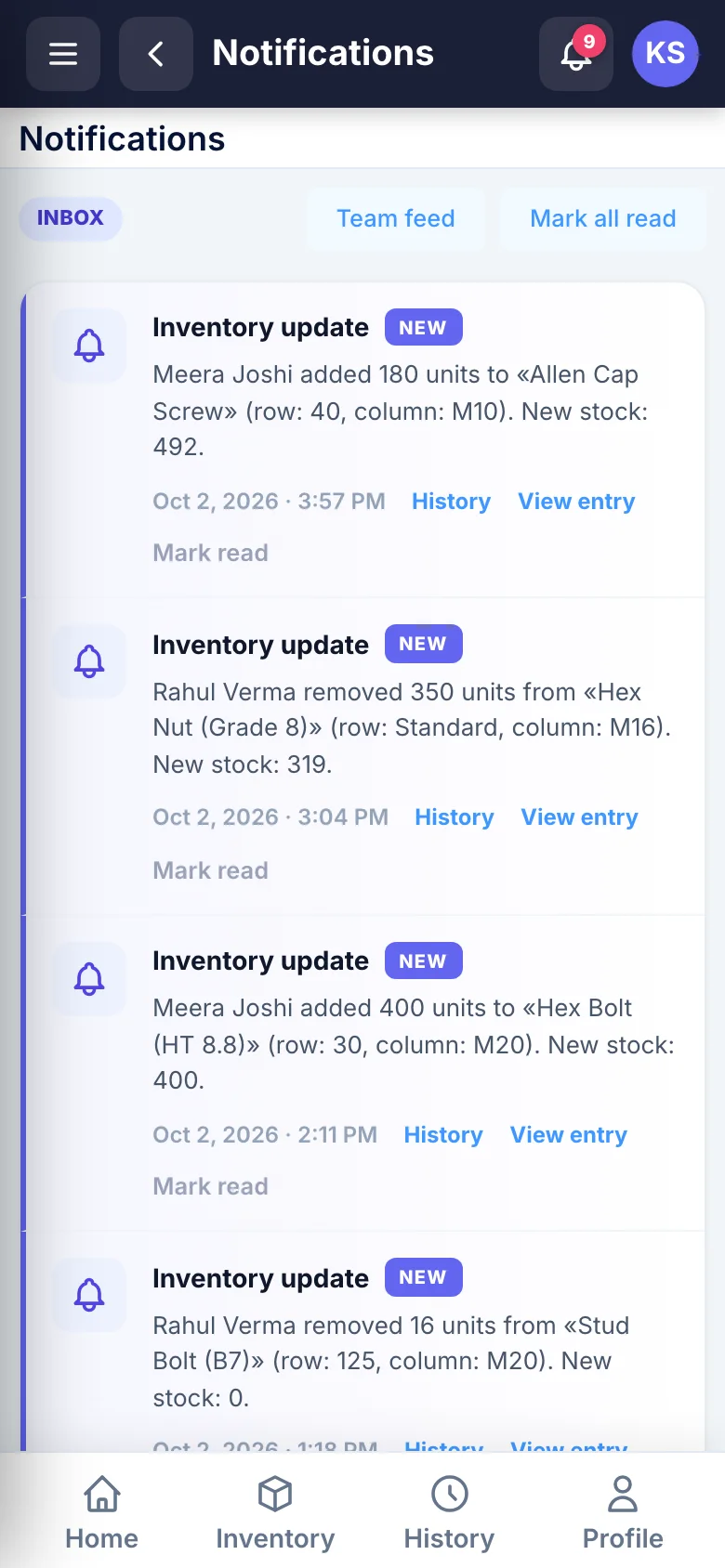
Each stock change creates a notification in the app's inbox, with links to the history and to the entry. At the same time the backend sends a push notification through Firebase Cloud Messaging to the phones that have signed in. An admin can switch mobile push off for the whole business, and each person can switch it off for themselves in My Profile.

Estimates for customers

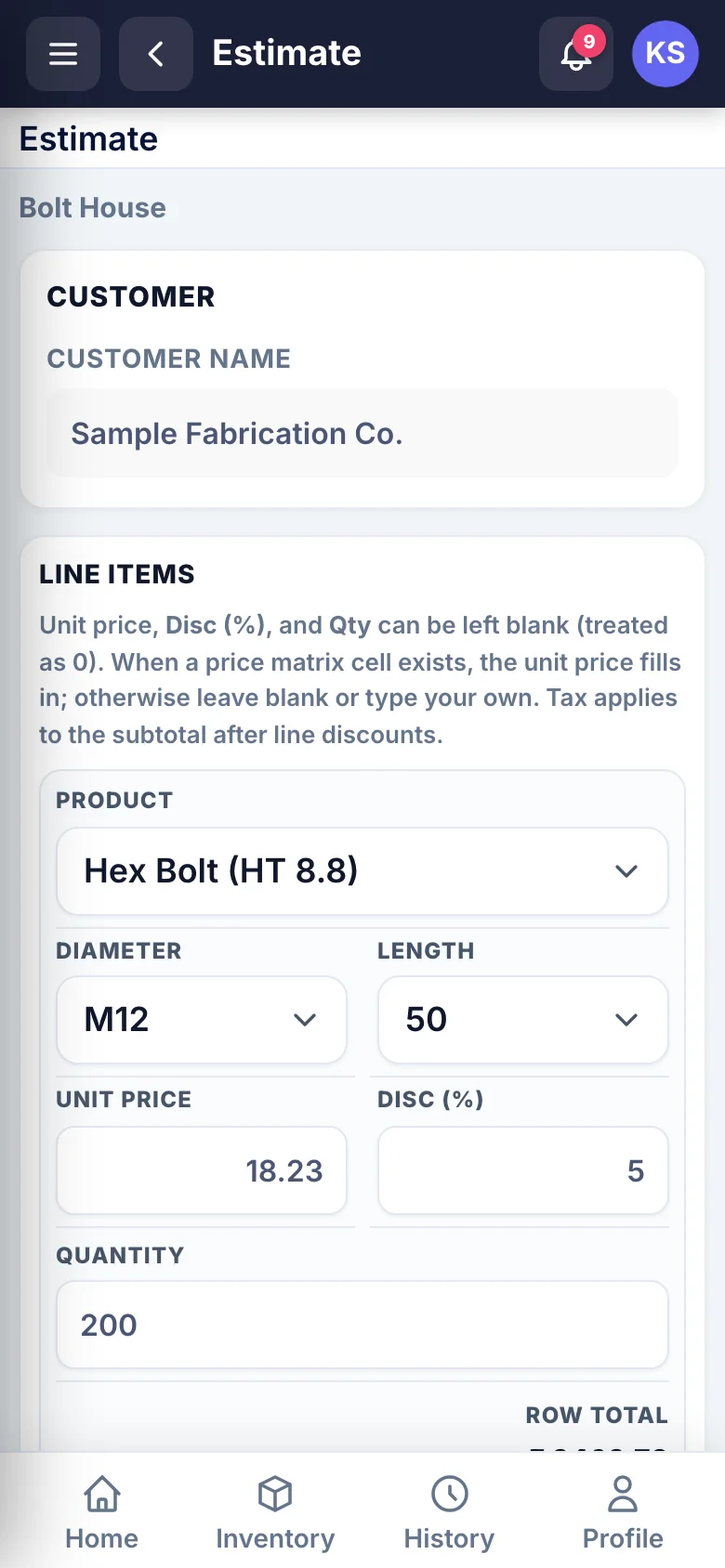
Admins can build an estimate inside the app: a customer name, then one line per item with product, diameter, length, quantity and an optional discount. The unit price fills in from the product's price matrix, and tax is added at the rate set in Settings. The estimate is generated as a PDF on the server and handed to the phone through a signed, single-use link that expires after 15 minutes, so it opens in the phone's own PDF viewer, ready to share or print.

How the app and the backend fit together

The app is written in React Native and ships for Android and iOS. Signing in returns a Laravel Sanctum token, and the app registers its Firebase token with the backend, along with the platform it runs on, so the server knows where to send push notifications. Signing out clears both.

The stock screens are served by the Laravel backend in a layout made for the phone, with a top bar, a side menu and a bottom tab bar, and the app shows them inside a WebView. A small bridge passes the sign-in token and the PDF links from the page to the app. Because the screens live on the server, a fix or a new screen reaches Android and iOS users at the same moment, without a new store release.

The phone's Back button behaves the way people expect: it goes back through the screens, and on the first screen it asks whether to close the app instead of quitting straight away.

Behind the app sits a JSON API of 18 endpoints for signing in, the profile and password, products, sizes, stock levels, stock updates and the history.

Technology

The app is built in React Native for Android and iOS. The backend is Laravel on PHP, with Laravel Sanctum for app tokens, Firebase Cloud Messaging for push notifications, DomPDF for estimate PDFs and Laravel Excel for importing and exporting stock and price matrices, on a MySQL database.

  • React Native
  • Android
  • iOS
  • React Native WebView
  • Laravel
  • PHP
  • Laravel Sanctum
  • Firebase Cloud Messaging
  • DomPDF
  • Laravel Excel
  • MySQL

03 — What it does

every feature on the live site

05 — Screens

captured from the live site

Bolt House — Products
ProductsEach product with its total stock, its number of sizes and how many of them are low or out of stock.
Bolt House — History
HistoryEvery movement with who made it, the quantity and the stock left after it, plus running totals in and out.
Bolt House — Notifications
NotificationsEach stock change lands in the inbox, with links to the history and to the entry itself.
Bolt House — Estimate
EstimateAdmins build a customer estimate line by line; unit prices come from the product's price matrix.
Bolt House — Side menu
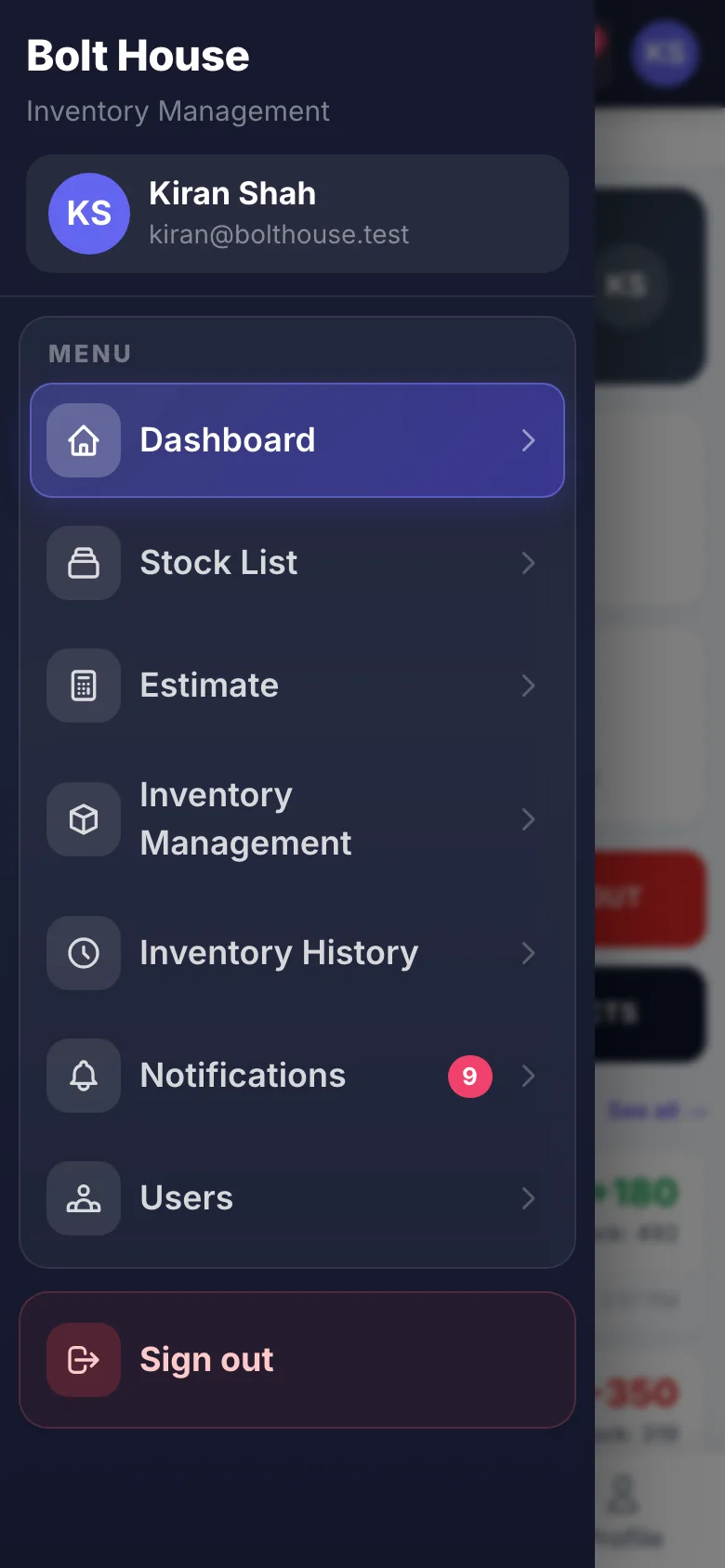
Side menuThe full menu with the signed-in user, the unread notification count and sign out.
Bolt House — Sign in
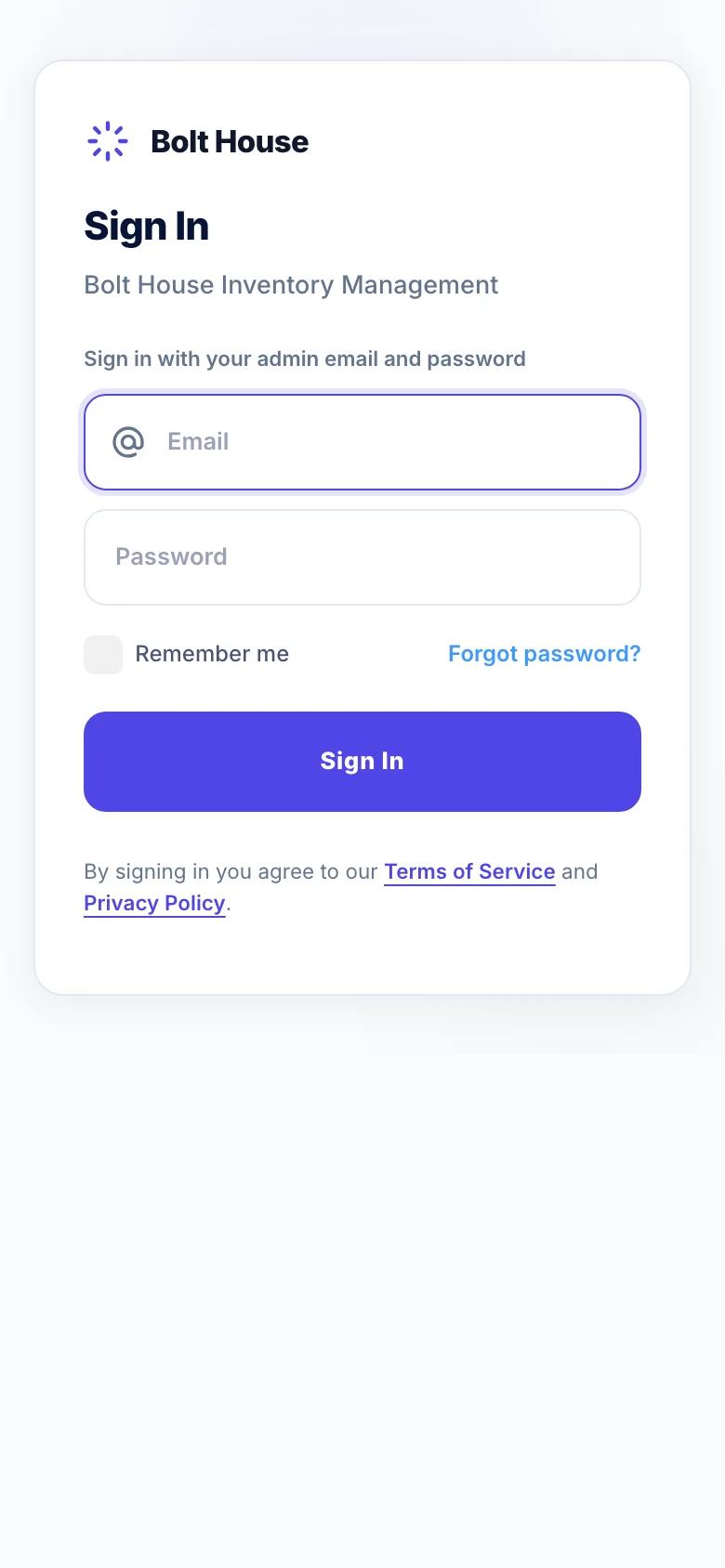
Sign inEmail and password sign-in, with a forgotten-password link.

07 — Questions

about building something like this

Can one app cover both Android and iPhone?

Yes. Bolt House is one React Native codebase for Android and iOS. The parts that differ, such as the notification permission prompt, the Android notification channel and the Apple push key in Firebase, are set up per platform, and both apps talk to the same Laravel backend.

Can stock be updated from the shop floor?

Yes. The stock in and out screen is built for one hand: pick a product and a size, tap a preset quantity and save. The server updates the stock, records who made the change and when, and tells the rest of the team.

How do the push notifications work?

When stock changes, the Laravel backend sends a Firebase Cloud Messaging notification to every phone that has signed in, with a link to the entry that changed. An admin can turn mobile push off for the whole business in Settings, and each person can turn it off in their own profile.

What would an app like this cost?

It depends on the screens, the user roles and how much of the backend already exists. An app like this is quoted as a fixed price after a short call, or built under the Hourly engineering package with a written estimate before any work starts.

09 — More work

live projects and written case studies

Live VEDUMIA handmade resin art studio, selling across India and abroad Live Umiya OilA Rajkot oil and lubricant shop, with every grade it stocks online Live Pandit booking platformA Django marketplace for booking pujas, upgraded to 2.0 Live ConfessioAn anonymous platform where professionals share the mistakes they made at work Live SmartPDF AIThirty PDF tools in a web app that works like a phone app Live Multi-vendor marketplace panelOne admin panel and one vendor panel for five kinds of business Live Hotel management softwareOne system for the daily rounds, checklists and issues of a group of hotels Live AuraSalon software that runs the chair, the counter and the books Live KooyaAn Indian jewellery and gifting brand, with a shop built around the gift Live Wats.inA city discovery platform for travellers, locals and the places they love All The full portfolioEvery live project, with screenshots. 62 Case studiesWeb, mobile and API projects, written up with names withheld.

11 — Your project

the next one on this page

Want one like this?

Tell me what you sell, who buys it and how they pay. I reply within one working day with questions, then a fixed price or an hourly estimate from $10.

Ahmedabad, India · IST (UTC+5:30) · --:-- IST · Mon–Fri 09:00–18:00 IST · US & EU overlap daily

No newsletter, no CRM. Just a reply.